2018年12月21日星期五

Everything You Should Know About Cumulus Linux

Nowadays, many new small-and-medium-sized internet companies choose to use a bare metal switch with a third party network operating system (NOS) for network construction. The NOS they choose is consistent with the Open Network Install Environment (ONIE), a network OS installer which supports loading a network OS of choice, and then changing to a different network OS later. Among all the network operating systems, Cumulus Linux is a very popular choice. Then, what is Cumulus Linux? What are the advantages of this NOS? Is it reliable to use? Let’s find out the answers together in the following text.

What Is Cumulus Linux?

Cumulus Linux is a powerful open network operating system designed for data center network infrastructures. It accelerates networking functions on a network switch, acting as a platform for modern data center networking tools to get networks managed like servers. This Debian-based network operating system (NOS) can be run on hardware produced by a broad partner ecosystem. That is to say, you can accelerate networking constructs on a broad range of industry-standard switches from different vendors with various port densities, form factors and capabilities.


Advantages of Cumulus Linux

In addition to the functions such as BGP and OSFP that a normal NOS enables, the Cumulus Linux has three main features that many other operating systems don’t support, namely Automation, EVPN and MLAG.
  • Automation: The biggest advantage of this feature is that it saves manpower by using automation tools. What’s more, it helps deployment and benefits from troubleshooting as well.
  • EVPN: The full name of “EVPN” is Ethernet virtual private networks. This modern interoperable technology can not only help you get rid of the complexity of the layer 2 but also allows legacy layer 2 applications to operate over next-generation layer 3 networks.
  • MLAG: It is an abbreviation for multi-chassis link aggregation group. As a new multi-device link aggregation technology for data center switch, MLAG configuration centralizes constituent ports on separate chassis, mainly serves as reliable load functionality to increase bandwidth and provide redundancy in emergent breakdown of one of the device.
Last but not least, in addition to the three main features, NCLU is another feature developed by Cumulus Networks to help those who have no idea how to use the Cumulus Linux OS. This is a function similar to the traditional CLI (Command Line Interface). It acts as a prompt command during configuration. Therefore, you don’t have to worry about the unfamiliarity to such a NOS you haven’t used before!

Is Cumulus Linux Stable?

Will the fault processing time be longer using the combination of a bare metal switch and an open network operating system Cumulus Linux? Actually, compared with the traditional network switch, the processing speed form this combination is basically the same as that of an Arista switch. It has very low latency as well.
In addition, the third-party systems such as Cumulus Linux based on Linux development have been very mature in today’s networking market just like the current operating systems (Windows, Linux, Redhat, Ubuntu, etc.) does. For example, FS N-serious switches are highly compatible with Cumulus Linux, and they both support EVPN and MLAG deployment.


Is Cumulus Linux Secure for My Data?

Of course it is secure. This NOS only process at the Control Plane. Your data is processed on hardware with chip and CPU. This is commonly known as isolation of the data layer and control layer.

Conclusion

From all the above, you may have a general understanding of the open network operating system Cumulus Linux. It is ideal to match with a bare metal switch in data center deployment. With this open NOS, you can accelerate networking constructs on switches from different vendors with various configurations easily and get easy deployment for future network construction.

Original Source: http://www.cables-solutions.com/cumulus-linux-wiki.html

2018年12月18日星期二

What Is Open Source Networking and How to Achieve It?

The traditional network architecture has been unable to meet the needs of enterprises, operators and network users. It has complicated configuration on equipment and is slow in iteration. To solve this problem, open source networking has emerged! Then, what is open source networking? How to achieve it? Just read through this post to find the answers!

What Is Open Source Networking?

Open source networking, or open source network, is a new-generation network that offers you programmable customization service, centralized unified management, dynamic traffic monitoring, and automated deployment. It makes the transformation of the data center architecture change to virtualization and automation. This new-generation network focuses on technology decoupling, which Dell EMC calls an open network, is the core of the transformation to software defined network (SDN).

The SDN is a new network architecture proposed by the ONF (Open Networking Foundation) to facilitate the whole open source networking environment. This architecture separates the control plane from the data plane. It has central management for network state information Logically. And the underlying network hardware infrastructure is abstracted and defined by the upper layer application. With this architecture, enterprises and operators have unprecedented programmability, automation, and network control capabilities to build a highly scalable and flexible network to adapt to their changing business needs.

How to Achieve Open Source Networking?

The open source network involves the open networking stack from top to bottom. It starts from networking hardware disaggregation and modern 100G or 400G data center switch, and then to network operating systems, network controllers, virtualization, and orchestration. Therefore, to realize open source network, many aspects are involved. Among all these, the network operating systems and data center switches are essential in almost all the networks. Therefore, I’ll take a network switch from Dell as an example.

To realize the open source networking, the underlying open hardware platform is required. This can offer an open source network operating system. For example, the new Dell EMC Z9264F-ON switch offers optimum flexibility and cost-effectiveness for the web 2.0, enterprise, midmarket and cloud service provider with demanding compute and storage traffic environments.

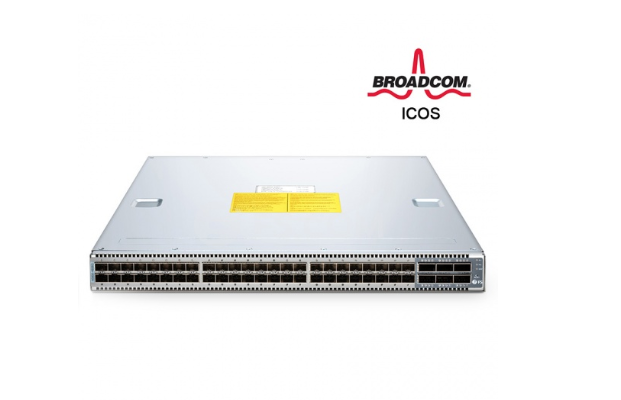
Actually, there are many other examples as well. For instance, the FS bare metal switch N5850-48S6Q works well with the open source network operating system (NOS) Broadcom ICOS. It supports current and future data center requirements, including a x86-based control plane for easier integration of automation tools. Of course, it offers an ONIE installer for 3rd party network operating systems and compatibility with SDNs via OpenFlow 1.3.11 as well. Such combination can centrally manage and control network devices of different vendors and use the common API abstracted from the underlying network. It facilities the automation and management capabilities of the whole network.


Open Source Networking Advantages

  • With an open source networking, there is no need to configure each device as in the past or wait for vendors to release new products.
  • It offers a common open programming environment for operators, enterprises, third-party software vendors and network users, accelerating the innovation speed of new services and functions of network deployment.
  • The network reliability and security can be improved through automated centralized network device management, unified deployment strategies and fewer configuration errors.

Conclusion

From all the above, you may have a general understanding of “what is open source network” and how to achieve it. This new-generation network offers you a programmable, automated system to help build a highly scalable and flexible network. It is promising in future network reconstruction. You can achieve it with common solutions involved with network switch, open source network operating system, etc.

Original Source: http://www.cables-solutions.com/open-source-networking-wiki.html

2018年12月7日星期五

Network OS Systems for Bare Metal Switch

As you may know that a network switch with no network operating system (NOS) is referred to as a bare metal switch. Unlike a white box switch with vendor’s own or 3rd party already loaded NOS, a bare metal switch allows you to load a network OS according to your own will. After installing the NOS, these two types of switches are normally regarded as the same. Then, how to choose network OS systems for bare metal switches? Listed below are three popular choices, namely Cumulus Linux, IP Infusion OcNOS™ and Pica8 PICOS.

Option 1: Network OS Cumulus Networks Cumulus Linux

Cumulus Linux is a powerful open network OS designed by Cumulus Networks to help build and operate large data center networks. Therefore, the Cumulus Linux is a perfect match for a data center switch which operates in bigger networks such as enterprise, data center and metro Ethernet scenarios. It is a true Linux distribution with a hardware abstraction layer that runs on a variety of commodity hardware. Cumulus Linux uses automated tools to manage the network infrastructure and hopes to automate the configuration of network switches with these existing tools.


Additionally, Cumulus Linux offers economical scalability and choice flexibility to run multiple network paths without the need for multiple switches. The main features of Cumulus Linux lie in the following aspects:
  • Economical Scalability: Customers can get increased operational efficiency with commodity hardware and a standardized Linux stack.
  • Built for the Automation Age: This Debian-based Linux distribution offers a completely open architecture and is designed for easy automation.
  • Standardized Toolsets: It allows open source and commercial Linux applications to run natively. You can use your own automation or other tools to improve efficiency and multiply the number of switches per operator.
  • 70+ Hardware Platforms for Choice: You can choose compatible hardware based on your needs and your budget flexibly.
Cumulus Linux enables modern data center architectures while providing a transition path for traditional data center architectures. It supports layer 2, layer 3 and overlay architectures. This open architectural approach enables a wide range of solutions such as Clos, L3 network, L2 network, campus expansion, out of band management, etc.


Option 2: Network OS IP Infusion OcNOS™

OcNOS™ is designed to address the needs of public, private or hybrid cloud networks. It offers Carrier-grade network OS for bare metal switches. It includes many advanced capabilities such as extensive switching and routing protocol support, MPLS, SDN, etc.
In addition to providing industry standard CLI, OcNOS™ supports all standard MIBs , other standard operation and management tools as well. The main features are:
  • Support Multiple Deployments: The several abstraction layers allow seamless portability across diverse network hardware.
  • Modular Software Design: This design can make it customized, built and packaged with minimal software features to reduce CapEx and device footprint.
  • Wide Interoperation: With CLI and SNMP management, the the OcNOS-based network node is easy to operate and interoperate with another vendor node.
  • Support for disruptive networking technologies: It enables SDN support through OpenFlow and can provide custom programmable network operations.

Option 3: Network OS Pica8 PICOS

The PICOS is also an open Linux-based network OS built on the robust Debian Linux environment for bare metal switches. It supports all major L2 and L3 switching. What’s more, it can leverage a vast array of standard Linux tools and supports IPv4 and IPv6 static routing as well.
In addition to the basic features mentioned above, the PICOS supports other functions depending on its two different editions. For PICOS enterprise edition, it supports CrossFlow dual control plane technology for improved OpenFlow integration, scale, and management. For PICOS SDN edition, it uses OpenFlow to control MPLS, GRE, NVGRE or VXLAN tunnels, delivering on the promise of open programmability.

Conclusion

From all the above, you may have a general understanding of the three main network OS systems. You can choose a proper one according to your actual needs. For example, if you need a Debian-based Linux distribution NOS with Clos solution for a 40GB switch, Cumulus Linux is a wise choice.

Original Source: http://www.cables-solutions.com/network-os-systems-bare-metal-switch.html

2018年11月30日星期五

12-Port 10GbE SFP+ Switch Recommendation

Nowadays, network users tend to have multiple requirements on a single network switch, especially on the functions and ports. Much evidence shows that the 10GbE SFP+ switch is getting more popular with greater demand. Listed below are some typical examples gathered from different forums on what switch they really need:

- “I want a 10G switch (8 or 12 SFP+ ports are better) with several Gigabit RJ45/SFP ports. And the switch must support VLAN and STP/RSTP. Any suggestions?”

- ”Looking for a layer2/layer3 10GbE switch with 8-12 ports and in the US$2,500 range. By the way, I prefer SFP+ rather than copper 10GbE since all the cables I have got are SFP+ DACs.”

- “Help! Need a 12-port or 16-port 10GbE SFP+ switch with relatively cheap price. Any suggestion would be appreciated!”

From the three thread descriptions above, the common Gigabit Ethernet switch can no longer meet the needs of many people. To meet all the requirements mentioned above, several 10G switches are recommended below:

FS S5800-8TF12S 12-Port 10GbE SFP+ Switch

The S5800-8TF12S 12-port 10 GbE SFP+ switch provided by FS.COM can meet all the demands mentioned above. This switch is a high-performance Ethernet switch with several highlights. It offers 8 x 1GbE SFP/RJ45 combo ports and 12 x 10GbE uplink ports in a compact 1RU form factor, which is ideal for hyper-converged infrastructure. In addition, this 10G switch supports both L2 and L3 packet processing. It has very low system power consumption of 65W at most.


D-link DXS-1210-12SC 10GbE SFP+ Switch

D-link DXS-1210-12SC is also a 12-port 10G switch. However, it can not meet all the demands mentioned from the three threads. This 10GB SFP+ switch only has 2 x 10GBASE-T/SFP+ combo ports. While, it has 10 x 10-Gigabit SFP+ Ports. It supports auto surveillance VLAN, L2 and L3 packet processing as well.

Mellanox SX1012X 10GbE SFP+ Switch

Mellanox SX1012X is an ideal 10GbE ToR switch with 12 ports. It is a high-performance small-scale switch in a half-width 1U form factor. It has 12 QSFP+ ports for uplink connection. If you buy this switch, you have to buy the corresponding DACs and optical modules together since it does not have other port for simple copper connection.

Netgear XS712T 10GbE SFP+ Switch

The Netgear XS712T is a 12-port 10-Gigabit copper smart switch with 10 dedicated 10GBase-T copper ports and 2 copper/SFP+ combo ports. The 10GBase-T copper ports can support 10G/1G/100M speeds and the combo ports are used for 10G connection. It is designed for SMB network with advanced L2+/Layer 3 lite features.

FS S5800-8TF12S vs D-link DXS-1210-12SC vs Mellanox SX1012X vs Netgear XS712T

How to choose a proper 10GbE SFP+ Switch for your network? Look at the following chart to compare the four different 10Gb SFP+ switches mentioned above:


From the comparison chart, it is clear that the biggest differences between these 10GbE SFP+ switches are the port types and numbers they support. You can choose a switch according to your actual needs. Of course, the price is another big factor which may affect your decision.

Conclusion

For the four 10GbE SFP+ switches recommended above, you can choose from the ports and the functions you need. For example, if you need the switch for hyper-converged infrastructure with 12 x 10 Gbps SFP+ ports, the FS S5800-8TF12S is a better choice. By the way, this switch offers a competitive price of US$ 1,899.00.

Original source: http://www.cables-solutions.com/10gbe-sfp-switch-recommendation.html


2018年11月23日星期五

FS S5850-32S2Q 10GbE 32-Port Switch With Two 40G QSFP+ Uplinks

Network switch has become unprecedented important in today’s networking market for its rapid update in performance. In the meanwhile, network users tend to have more requirements on a single switch, such as more port numbers, bigger switching capacity, higher bandwidth, etc. Here, we will introduce FS S5850-32S2Q 10GbE 32-port switch featuring all these requirements.

FS S5850-32S2Q 10GbE 32-Port Switch Overview


FS S5850-32S2Q 10GbE 32-Port Switch Ports
The S5850-32S2Q switch has 32 ports for 10Gb SFP+ connection and 2 ports for 40G QSFP+ Uplinks. That is to say, it has a non-blocking bandwidth of up to 400Gbps. In addition, It offers a switch fabric capacity of up to 800Gbps and forwarding rate up to 596Mpps.


FS S5850-32S2Q 10GbE 32-Port Switch Key Features
The key features of this 32-port switch lie in that it provides high-performance, high interface density, and low latency to facilitate the rapid service deployment. The detailed key features are listed below:
  • Supports advanced data center features including MLAG, VXLAN, IPv4/IPv6, SFLOW, SNMP, Priority Flow Control (PFC) and data center TCP.
  • Provides L2 and L3 network service.
  • Supports a complete set of security features like IEEE 802.1x, DHCP Snooping and L2/L3/L4 multi-layer ACLs (Access Control Lists).
  • In case of an Ethernet ring network failure, the backup link will quickly recover the communication between the ring network nodes.
FS S5850-32S2Q 10GbE 32-Port Switch Main Uses
The two main uses of this 32-port switch lie in that it is not only an aggregation or access switch in Metro L2 ring network but also a leaf switch in enterprise data center.
1)Metro L2 Ring Network Application:
Ring network, also known as ring topology, is one of the network topologies in which each node is exactly connected to two other nodes. Therefore, it can form a ring-like pathway by transmitting signals through each node. The ring network reduces chances of data collision since each node releases a data packet after receiving the token. The picture below shows FS S5850-32S2Q switches for Metro L2 ring network topology as aggregation or access devices. These aggregation switches mainly use QinQ or ERPS features to deliver Metro Ethernet service.


2)Enterprise Data Center Network Application
The S5850-32S2Q 10GbE 32-port switch can provide access ports for high density 10GE servers and 40GE uplink ports to aggregation or core switches as well. It can be used as leaf switch in data center access network topology with features such as VLAN, LACP, RSTP&MSTP, MLAG, DCB, etc.


FS S5850-32S2Q Buyer’s Guide

In addition to the information mentioned above, there are other specifications you need to know about FS S5850-32S2Q when choosing a 32-port switch. Listed below are the most important specifications for reference before buying this 10GB switch.


Conclusion

All in all, it is clear that the FS S5850-32S2Q 10GbE 32-port switch supports comprehensive protocols and applications. It plays an important role in data centers, Metro, enterprise network, campus network, etc. This 10GB switch is ideal to facilitate the rapid service deployment in both traditional L2 or L3 networks. You can enjoy a non-blocking bandwidth of up to 400Gbps! By the way, if you want an additional Gigabit switch for other use, FS offers multiple choices for you as well.

Original source: http://www.cables-solutions.com/fs-32-port-switch-two-40g-qsfp-uplinks.html

2018年11月15日星期四

FS 1U Rack Mount Enclosure Comparison: FHD-1UFMT-N vs FHD-1UFCE

Nowadays, rack mount enclosure (or rack enclosure) is widely used in enterprise data centers, server rooms, schools, etc. to manage network cables. As one of the most popular options, 1U rack mount enclosure is a priority choice in many situations. While, normally, there are two styles (slide-out style and removable style) of enclosures in the same 1U rack space. Then, how to choose a proper one for your cabling? Next, let’s take the comparison on two types of FS 1U rack mount enclosures as an example.


FS FHD-1UFMT-N 1U Rack Mount Enclosure

FHD-1UFMT-N is one of the FHD series products that self-developed by FS.COM. The FHD series products focus on easy-to-manage high density fiber cabling. It is a cost-effective and reliable solution for fiber cable management in data centers, server rooms, CATV (Cable TV), etc.

FS FHD-1UFMT-N 1U Rack Mount Enclosure Technical Information

  • Net Weight: 3.65KG
  • Dimensions: 44mm(H) x 430mm(W) x 281.9mm(D)
  • Material: Steel with black powder coating
  • Modular Design: 4 x FAPs or 4 x HD MTP/MPO cassettes can be loaded, up to 96 fibers
  • Accessories: Mounting hardware and accessory kit with labels included

FS FHD-1UFMT-N 1U Rack Mount Enclosure Key Feature: Removable Lid in Design
FHD-1UFMT-N is a 1U rack mount enclosure with an easy-to-move cover. That is to say, this rack mount fiber patch panel has a removable lid. You can remove its cover and then organize your cables with different solutions. It can hold up to 4 x fiber adapter panels or 4 x MTP/MPO cassettes of up to 96 fibers for cable management.

FS FHD-1UFMT-N 1U Rack Mount Enclosure Three Main Uses
This FHD-1UFMT-N enclosure can provide you with multiple solutions on fiber optic patching, terminating and splicing applications. Here are the three main uses of this 1U rack mount enclosure:

1) It enables fiber splice tray installation and removement. In addition, one FHD-1UFMT-N enclosure can hold up to 4 splice trays.

2) It can hold up to 2 slack spools for cabling.

3) It supports high-density cabling management with up to 4 MTP or MPO cassettes.

FS FHD-1UFMT-N 1U Rack Mount Fiber Enclosure Inside Cabling


FS FHD-1UFCE 1U Rack Mount Enclosure

FHD-1UFCE enclosure is also one of the self-developed products provided by FS.COM. This 1U rack mount enclosure offers you easy and quick installation within its 1U space.

FS FHD-1UFCE 1U Rack Mount Enclosure Technical Information

  • Net Weight: 5.6KG
  • Dimensions: 44mm(H) x 448mm(W) x 467.5mm(D)
  • Material: Steel with black powder coating
  • Modular Design: 4x FAPs or 4x HD MPO/MTP cassettes can be loaded, up to 96 fibers
  • Accessories: Mounting hardware and accessory kit with labels and bend radius bracket included

FS FHD-1UFCE 1U Rack Mount Enclosure Key Feature: Slide-out Style in Design
FHD-1UFCE is a 1U rack mount enclosure with a parallel sliding drawer. Compared with the normal design with removeable lid, this unique design saves your time and energy without removing the top cover whenever installation is needed. You can slide the drawer out and then install matching products to organize your cables with ease. It can hold up to 4 x fiber adapter panels or 4 x MTP/MPO cassettes of up to 96 fibers for cable management as well.

FS FHD-1UFCE 1U Rack Mount Enclosure Uses
The main uses of this 1U rack mount enclosure are the same as FHD-1UFMT-N rack enclosure. The FHD-1UFCE supports patch cord connections with slack spools, storage of spliced fiber pigtails and cabling management with MTP or MPO cassettes as well.

FS FHD-1UFCE 1U Rack Mount Enclosure Cabling Solution


Buyer’s Guide: FHD-1UFMT-N vs FHD-1UFCE
Normally, these two styles (slide-out style and removable style) of enclosures have much in common. However, they still differ from each other.


Conclusion

For 1U rack mount enclosure choosing, you can take many factors into consideration. As for FHD-1UFMT-N vs FHD-1UFCE, the main applications are the same. They both can be used for patch cord connections, storage of spliced fiber pigtails and high-density MTP or MPO cabling management. Therefore, you can focus on their differences in price, installation design, dimensions, weight, etc. By the way, FS offers other rack mount enclosures such as 2U, 4U as well. You can choose a proper fiber enclosure according to your actual needs.

Original source: http://www.cables-solutions.com/fs-fhd-1u-rack-mount-enclosure-comparison.html

2018年11月2日星期五

FS 24-Port Managed Switch With Both Fanless & Stackable Features

From an application point of view, the current market demand for products is becoming more and more multi-functional. For example, different industries have different functional requirements for network switches, especially for the currently popular 24-port managed switch. You may often see the questions on Reddit seeking for help like the situations below:

- “I am looking for a quiet or fanless switch to install in my office. It is better to have at least 24 ports and support SFP+ uplinks. Any suggestions on where to buy one?"

- “Looking for a 24-port stackable switch for home lab. It would be nice if it could support 10G interconnection. Any advice would be appreciated!”

It seems that a 24-port fanless switch or stackable switch is a popular trend for network construction. Then, can I own a 24-port managed switch with both the characteristics of these two switches? Yes, FS S3900-24T4S 24-port managed switch can meet your needs.

FS S3900-24T4S 24-Port Managed Switch Meets All Your Needs

Key Features: Fanless & Stackable in Design

The key features of FS S3900-24T4S 24-port managed switch are that it is not only a fanless switch but also a stackable switch.

The fanless design of S3900-24T4S ensures noiseless operation and increases the reliability and energy efficiency of the system. And the stackable feature of S3900-24T4S simplifies network administration. Whether it operates alone or “stacked” with other units, there is always just a single management interface for the network administrator to deal with. This simplifies the setup and operation of the network. The S3900-24T4S 24-port managed switch is almost an omnipotent switch for choice under many circumstances.


In addition to the two main features mentioned above, this 24-port managed switch has other significant features.

Specification of S3900-24T4S 24-Port Managed Switch


How to Install and Use FS S3900-24T4S 24-Port Managed Switch?

Installation Tips:

Temperature: Check if the operation temperature is within the specified operating temperature range. Make sure to keep a sound air flow of the rack environment.
Avoid additional weight: Do not place any other device or equipment on this switch.
Grounding: Keep this switch well grounded.
Note: If you want to mount this switch on a rack, pay attention to the circuit capacity as well. Check whether the circuit will be overload or not before installing S3900-24T4S on the rack. If the circuit can not bear the load of the switch, do not install it at your own will.

How to Use S3900-24T4S 24-Port Managed Switch:

For copper connection: You can use Cat5 cable for 10/100Base-T connection and use Cat5e, Cat6, Cat6a or above to reach 1000Base-T connection.

For fiber connection: Since the S3900-24T4S 24-port managed switch has four 10G SFP+ ports, you can use a variety of 10G optical transceivers and cables to connect with other network devices. The supported transceivers include 10G SFP+, BiDi SFP+, CWDM SFP+, DWDM SFP+, 10GBASE-T SFP+, etc. While the supported cables could be 10G DAC cable and AOC cable. In addition, this switch allows backwards compatibility on 1G SFP. All third-party modules and DAC/AOC cables can be used on the SFP+ ports of this switch, which can save a lot of deployment costs.

Conclusion

From all the above, you may have a general understanding of FS S3900-24T4S 24-port managed switch. Endowed with so many powerful features such as fanless and stackable design, this switch offers unique advantages over many switches in the market. If you want a switch with both fanless and stackable features, FS S3900-24T4S is a priority choice!

Original source: http://www.cables-solutions.com/fanless-stackable-24-port-managed-switch.html